


An industrial workbench should do more than provide a flat surface. The right configuration can keep tools within reach, reduce unnecessary movement, support heavy equipment, improve operator comfort, and help work move smoothly from one step to the next.
The challenge is that no single setup works for every operation. A maintenance technician handling heavy components needs a different workstation from an employee packing small e-commerce orders. An inspection station may require frequent height changes, while a warehouse packing area may need more storage and a larger work surface.
Before choosing a workbench, start with the work being performed. This guide explains how to configure an industrial workbench around your workflow, space, equipment, storage needs, and future growth.
What Is an Industrial Workbench Configuration?
A workbench configuration is the combination of features that determines how the workstation supports a particular task. These features may include:
- Work surface dimensions
- Tabletop material
- Working height
- Load capacity
- Frame design
- Lower shelves
- Drawers and cabinets
- Pegboards and overhead storage
- Casters or leveling feet
- Power and lighting
- Material-handling accessories
A good configuration places frequently used tools and materials close to the operator while leaving enough open space to complete the task safely. It also supports the weight of the equipment and materials used during normal operations.
The goal is not to add as many accessories as possible. The goal is to create a workstation that matches the sequence of work.
1. Start with the Work Being Performed
Before comparing workbench sizes or accessories, document what happens at the workstation.
Ask the following questions:
- What tasks will employees perform?
- What tools, machines, or materials will be placed on the bench?
- How large and heavy are the items being handled?
- Does the operator remain in one position or move around the workstation?
- Is the work performed while sitting, standing, or both?
- How frequently do operators reach for tools and supplies?
- Does the workstation support one person or multiple operators?
- Will the process change during busy seasons?
It can help to divide the work surface into three functional zones.
Primary work zone
This is the area directly in front of the operator. Place the item being assembled, inspected, repaired, or packed here. Frequently used hand tools should also remain within easy reach.
Secondary supply zone
This area holds materials used repeatedly but not continuously, such as fasteners, labels, tape, replacement parts, and packing supplies. Shelves, bins, drawers, or pegboards can keep these items organized without crowding the primary work area.
Finished-work zone
This is where completed products, packed cartons, or inspected components are placed before moving to the next step. Separating incoming and finished work helps prevent bottlenecks and mix-ups.
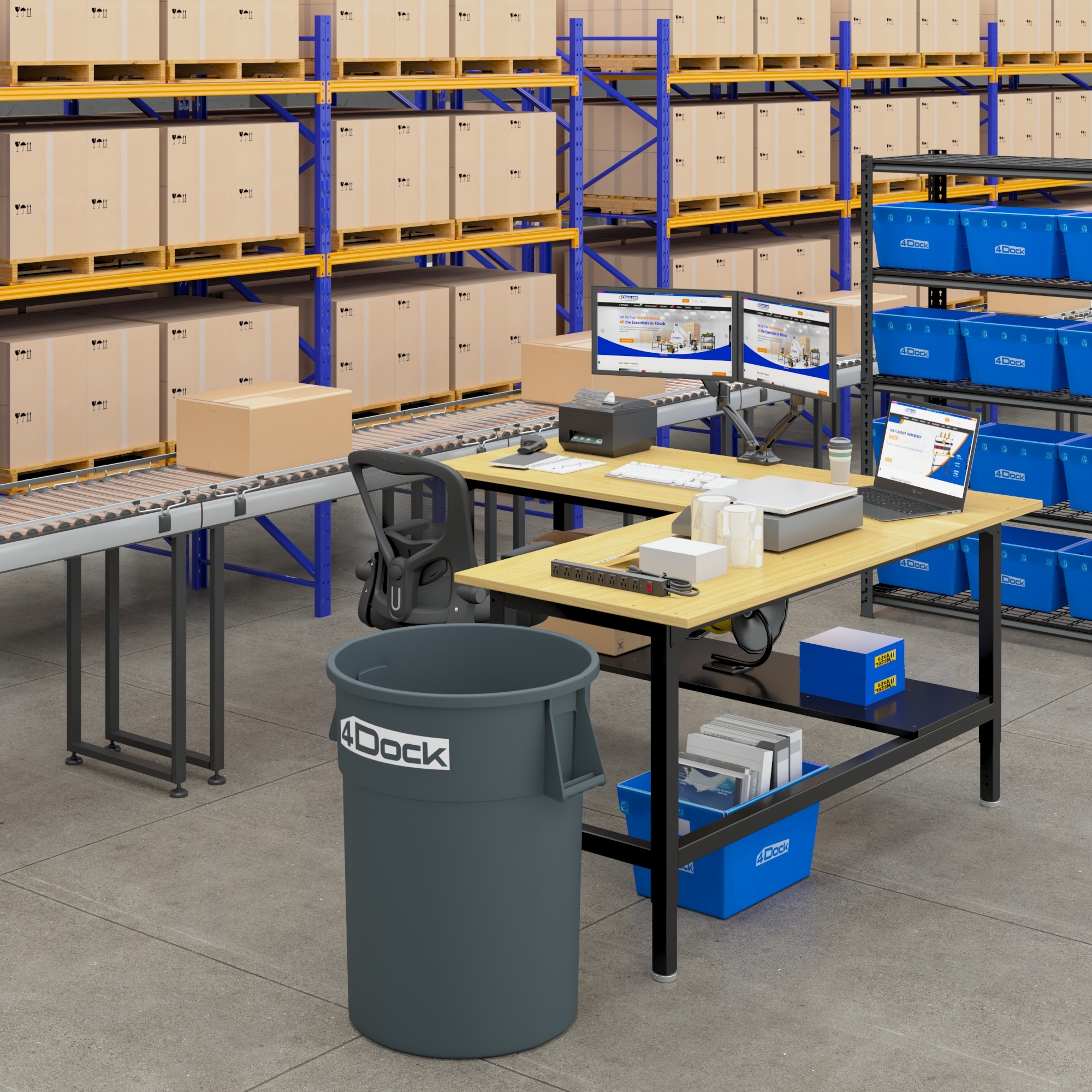
For a multi-step process, consider an L-shaped workstation. The right-angle layout can create separate zones for tasks such as assembly and inspection or packing and labeling. For example, 4Dock’s 72" × 72" L-Shaped Industrial Packing Table is designed for assembly lines, logistics operations, production cells, and other workflows that benefit from two connected work surfaces.
2. Determine the Required Work Surface Size
A larger workbench is not automatically more efficient. An oversized bench can consume valuable floor space and encourage clutter, while a bench that is too small forces tools and materials into the active work area.
Measure everything that must remain on the tabletop, including:
- Products or components
- Tools and fixtures
- Monitors or documentation
- Scales and label printers
- Small machines
- Packaging materials
- Temporary staging space
Then allow enough open surface for the operator to complete the task without repeatedly moving equipment.
When a compact workbench works best
A 48- or 60-inch workbench may be appropriate for:
- Small repair areas
- Individual assembly tasks
- Tool storage
- Light-duty workshops
- Limited floor space
- Dedicated single-purpose stations
When to choose a 70- or 72-inch workbench
A workbench around 70 to 72 inches wide offers a balance between usable workspace and floor efficiency. It can support:
- General warehouse packing
- Maintenance and repair
- Product assembly
- Quality inspection
- Kitting
- E-commerce order preparation
For example, 4Dock offers rubberwood workbenches in 60" × 30" and 72" × 36" configurations. These models provide adjustable working heights and up to 3,000 pounds of stated load capacity for heavy-duty operations.
When an extra-large workbench is useful
Large cartons, long parts, multiple pieces of equipment, or two-person workflows may require a wider and deeper work surface.
The 4Dock 90" × 48" Heavy-Duty Industrial Packing Table provides additional space for oversized cartons, bulky components, multi-step work, and some multi-operator applications. Its six-leg steel frame and rubberwood top are designed for demanding warehouse and industrial environments.
Before choosing an extra-large model, confirm that employees can still reach commonly used tools without stretching across the tabletop.
3. Choose the Right Tabletop Material
The tabletop must match the materials, tools, cleaning practices, and environmental conditions in the workspace.
Rubberwood
Rubberwood provides a strong, impact-resistant work surface for:
- Assembly
- Packing
- Maintenance
- Repair work
- General manufacturing
- Warehousing
It is a practical choice when the bench must support heavy cartons, tools, fixtures, or components. However, as with most wood-based surfaces, standing water and prolonged exposure to moisture should be avoided. Small spills should be wiped up promptly.
Stainless steel
A stainless steel surface is useful when cleanliness, corrosion resistance, or frequent wiping is important. Typical applications include:
- Food-related work areas
- Laboratories
- Quality-control stations
- Clean packing environments
- Facilities handling liquids or chemicals compatible with the surface
Engineered wood or particleboard
Engineered wood can be suitable for lighter-duty packing, storage, and general-purpose work where controlling cost is important. It should be used in a dry indoor environment and protected from prolonged moisture exposure.
When comparing tabletop materials, consider more than the initial price. Cleaning requirements, impact exposure, moisture, chemical contact, and the expected service life all affect the long-term value of the surface.
4. Match Load Capacity to the Real Working Load
Workbench load capacity should cover everything placed on the bench—not only the product being worked on.
Include the combined weight of:
- Machines and equipment
- Tools and fixtures
- Shelving and installed accessories
- Stored materials
- Parts or products
- Multiple cartons
- Temporary peak loads
For demanding applications, allow a safety margin instead of selecting a bench that barely meets the estimated load.
Many of 4Dock’s fixed industrial workbenches, including the WB5 heavy-duty series, are rated for up to 3,000 pounds in their specified stationary configuration. These models use reinforced steel frames and solid rubberwood work surfaces for packing, assembly, manufacturing, and maintenance applications.
_20260904_hfubKg1t.jpg)
However, load capacity can vary significantly between configurations. For example, an electric height-adjustable bench may prioritize movement and ergonomic adjustment rather than maximum static capacity. 4Dock’s 72" × 36" Electric Height-Adjustable Workbench has a stated capacity of 700 pounds.
Never assume that adding heavy-duty casters preserves the original stationary load rating. Follow the capacity and operating instructions for the complete workstation configuration rather than adding together the individual ratings of its components.
5. Choose Fixed or Adjustable Working Height
Workbench height affects posture, reach, visibility, and the amount of force an employee can apply.
The best height depends on the task:
- Precision and inspection work: A higher work surface can bring small components closer to eye level.
- General packing and assembly: A surface near elbow height can help reduce bending and reaching.
- Force-intensive work: A slightly lower surface can make it easier to apply downward pressure.
- Mixed tasks or shared workstations: A wider adjustment range may better accommodate different operators.
Manually adjustable workbenches
A manually adjustable bench works well when the desired height can be set during installation and does not need to change frequently.
Several 4Dock heavy-duty workbenches offer adjustable working ranges around 30"–36" or 31"–37", depending on the model. This allows the workstation to be configured for the operator and the primary task while retaining a simple, stable structure.
Electric height-adjustable workbenches
Choose electric adjustment when:
- Operators alternate between sitting and standing
- Multiple employees share the workstation
- Different tasks require different working heights
- Products vary significantly in height
- Frequent adjustment is part of the process
The 4Dock electric industrial workbench adjusts from 29" to 48" and includes a dual-motor lift system and anti-collision protection. It is suited to production, inspection, kitting, packing, and maintenance work that requires regular height changes.
6. Plan Above-Workbench Storage
The space above the work surface can keep frequently used tools and supplies visible without taking up valuable tabletop space.
Common above-bench options include:
- Pegboards
- Small-parts bins
- Overhead shelves
- Dividers
- Tool hooks
- Document holders
- Lighting
- Power strips
A pegboard works well for hand tools that employees need to identify and retrieve quickly. An overhead shelf can hold lightweight supplies, while shelf dividers keep cartons, mailers, or different material types separated.
For packing applications, overhead accessories can organize supplies in the order they are used. The 4Dock Packing Workbench Accessories Set includes upright rails, a divided shelf, and material-handling components that can help turn a compatible table into a more organized packing station.
Avoid placing heavy or rarely used items overhead. Store heavier materials at waist height or below, and keep overhead storage within a safe, comfortable reaching distance.
7. Plan Under-Workbench Storage
The space beneath the work surface can support storage without expanding the workstation’s footprint. However, lower storage should not interfere with the operator’s legs, seating position, or access to the primary work area.
Lower shelves
Lower shelves are useful for:
- Cartons
- Replacement parts
- Bulk supplies
- Tool cases
- Frequently replenished materials
The 4Dock 72" × 36" Workbench with Integrated Lower Shelf keeps commonly used items accessible while preserving some open space beneath the tabletop.
For operations requiring more flexible storage, 4Dock also offers large packing tables with configurable shelves. Depending on the configuration, these tables can include wood or steel lower shelves, casters, a pegboard panel, or a side storage pouch.
Drawers and cabinets
Drawers are better for:
- Small tools
- Measuring devices
- Personal protective equipment
- Documents
- Items that should be protected from dust
Cabinets can provide higher-capacity enclosed storage for tool-heavy maintenance and repair work.
Do not fill every open area with storage. Keeping part of the under-bench area open can improve legroom, make cleaning easier, and provide space for carts, containers, or future equipment.
--shopstart--{"id":10014106,"link":10014106,"name":"Heavy-Duty Industrial Cabinet Workbenches","shortName":"Heavy-Duty Industrial Cabinet Workbench","url":"https://s3.fd.springbeetle.com/prod-usfd-bucket/20260821-103101_20260821_JnSeOZ4D.png","itemFootMarkType":"NONE"}--shopend--
8. Decide Between Leveling Feet and Casters
Mobility changes how a workstation functions, so decide whether the workbench should remain fixed or move between work areas.
Choose leveling feet when:
- The bench supports heavy equipment
- Maximum stability is the priority
- The work involves repeated force or vibration
- The workstation will remain in one location
- The floor is slightly uneven
Leveling feet can help stabilize the bench without requiring a perfectly flat floor.
Choose casters when:
- The layout changes frequently
- Workstations move between production areas
- The bench must be relocated for cleaning
- Teams need temporary project stations
- Seasonal demand requires flexible floor space
4Dock offers locking caster sets for compatible workbench frames, including four-, six-, and eight-caster configurations. Confirm compatibility before ordering, and lock the casters whenever the workstation is in use.
A mobile workstation should also be configured with weight distribution in mind. Store heavier items low and near the center of the bench, keep the travel path clear, and remove unstable materials before moving it.
9. Add Lighting, Power, and Cable Management
Poor lighting and disorganized cables can reduce the effectiveness of an otherwise well-designed workstation.
Lighting
Task lighting should illuminate the active work area without creating glare or shadows. Inspection, electronics, detailed assembly, and repair tasks generally need more focused lighting than basic carton packing.
Power
List every powered device used at the workstation, such as:
- Label printers
- Scales
- Computers and monitors
- Hand tools
- Test equipment
- Charging stations
- Lighting
Install enough outlets to avoid relying on loose extension cords. Power strips and cables should be mounted away from moving parts, sharp edges, heat sources, and areas exposed to impact or liquids.
Cable management
Route cables along the frame or dedicated channels instead of allowing them to hang beneath the work surface. If the bench is height-adjustable, leave enough controlled cable length for the full adjustment range.
For mobile workstations, disconnect facility power before moving the bench unless the system has been specifically designed for mobile power.
10. Leave Room for Future Accessories
A workbench should fit the current process while remaining adaptable to reasonable future changes.
Before finalizing the configuration, consider whether the operation may later require:
- Additional shelves
- Pegboard storage
- Drawers or cabinets
- Casters
- Labeling equipment
- Material roll holders
- Dividers or bins
- A monitor or documentation holder
- Power and lighting
- A different workstation layout
A modular approach allows a business to begin with a basic workbench and add storage or workflow accessories when needed. However, not every accessory fits every frame. Confirm dimensions, mounting points, leg count, clearances, and load limits before purchasing components separately.
For facilities with several locations or departments, standardizing a small number of base configurations can also simplify purchasing, employee training, parts replacement, and future expansion.
Example Workbench Configurations by Application
Warehouse packing station
A general warehouse packing station may include:
- 60"–72" work surface
- Adjustable working height
- Lower shelf for cartons or supplies
- Overhead shelf with dividers
- Roll holder for packing material
- Scale and label printer
- Power strip and cable management
- Leveling feet for a permanent station or locking casters for a flexible layout
Arrange supplies according to the packing sequence: carton preparation, product placement, void fill, sealing, weighing, labeling, and completed-order staging.
_20260904_kMe8Jf1P.jpg "WB3RB image 604 (4).jpg")
Heavy-duty assembly station
A heavy-duty assembly workstation may need:
- Reinforced steel frame
- Rubberwood or another impact-resistant top
- Load capacity that includes tools, fixtures, and components
- Stable leveling feet
- Tool storage below the work surface
- Pegboard for frequently used hand tools
- Focused task lighting
Choose the bench capacity based on the heaviest realistic working load—not the average load.
Maintenance and repair workstation
A repair station may include:
- Heavy-duty work surface
- Drawers or cabinets
- Pegboard tool organization
- Integrated lower shelf
- Power access
- Task lighting
- Open space for equipment brought in for service
Frequently used tools should remain visible and accessible, while sensitive or higher-value items can be kept in enclosed storage.
Quality-control or inspection station
An inspection workstation may benefit from:
- Electric height adjustment
- Bright, controlled lighting
- Clean work surface
- Space for measuring and test equipment
- Monitor or document holder
- Organized power and data cables
- Limited clutter around the inspection area
If several employees use the station, electric adjustment can make it easier to reset the work surface for each operator or product.
Flexible production or kitting station
A flexible station may use:
- Locking casters
- Adjustable height
- Modular bins or shelving
- Open under-bench space
- Portable power or clearly managed connections
- Standardized tool locations
This configuration can be repositioned as production volume, product mix, or floor layout changes.
Industrial Workbench Configuration Checklist
Before purchasing or configuring a workbench, confirm the following:
- The workstation matches the actual sequence of work.
- The tabletop is large enough for products, tools, equipment, and staging.
- The tabletop material suits the environment and cleaning requirements.
- The total working load remains within the specified capacity.
- The height range fits the operator and the task.
- Frequently used items are within a comfortable reach.
- Heavy supplies are stored low and securely.
- Lower storage does not block legroom or cleaning access.
- Casters or leveling feet match the need for mobility and stability.
- Power, lighting, and cables are safely organized.
- Accessories are compatible with the workbench frame.
- The configuration leaves room for future workflow changes.
Build the Workstation Around the Process
The most effective industrial workbench is not necessarily the largest or the most heavily accessorized. It is the one that supports the work being performed with the least unnecessary movement, reaching, searching, and material handling.
Start with the task. Then select the appropriate work surface, load capacity, height range, storage, mobility, and accessories. A well-planned configuration can improve daily efficiency while leaving enough flexibility for new products, higher order volumes, and changing facility layouts.
Explore 4Dock industrial workbenches and packing tables to compare heavy-duty, height-adjustable, mobile, storage-equipped, and application-specific workstation configurations.